gh-reloaded

GH Reloaded


A Chrome extension that injects small, focused UI enhancements into github.com, aimed at making GitHub itself more pleasant to use.
It’s a collection of independent features, not a single-purpose tool: each one lives in its own folder under features/ and can be added, removed, or shipped on its own. GitHub covers the fundamentals well; this is for the gaps that are easier to fill from the outside than to wait on.
Install (unpacked, for now)
This isn’t on the Chrome Web Store yet.
1. Load the extension
- Clone this repo.
- Open
chrome://extensions, enable Developer mode (top-right toggle). - Click Load unpacked → select the repo folder.
- Open Settings: click the extension’s toolbar icon, or from
chrome://extensions→ the extension’s card → Details → Extension options.
2. Create a GitHub token
Go to github.com/settings/personal-access-tokens/new (a fine-grained token, not classic) and set:
- Repository access → Only select repositories → pick the repo(s) you want this on.
- Permissions → Repository permissions → set both of these to Read-only:
- Issues — sub-issues, dependencies, org-level custom fields (Team / Business Value / Effort)
- Projects — Projects v2 Status
- Everything else stays at No access.
- Click Generate token and copy it immediately — GitHub shows it exactly once.
If the repo belongs to an organization with SSO enforced (or with a policy restricting personal access tokens), one more step: go to github.com/settings/tokens, find the new token, and click Configure SSO / Authorize next to the org’s name. Without this, requests to that org’s data can silently come back empty or 404, since GitHub doesn’t otherwise reveal that the resource exists.
3. Connect it
Back in the extension’s Settings page: paste the token, Save, then Test connection — it should report the GitHub username the token authenticates as.
Features
Screenshots below are mockups illustrating each feature’s layout and colors (matched to the extension’s actual dark-theme CSS) — not literal captures of a live GitHub page.
Dependency graph — features/dependency-graph
On a GitHub issue page (or a Projects board’s issue-preview side panel) that has sub-issues, injects a left-to-right dependency graph below the sub-issues list.
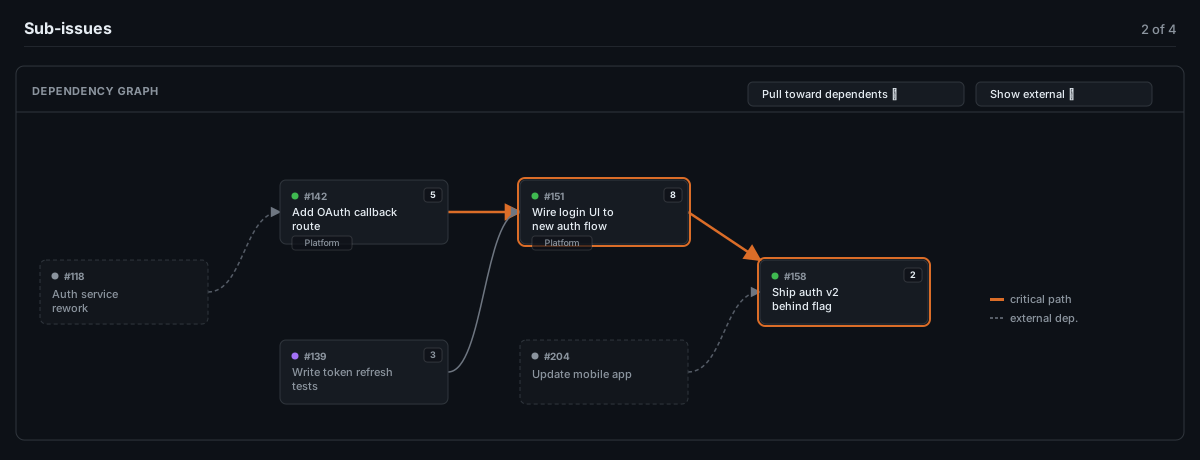
- Fetches the issue’s direct sub-issues, their “blocked by” / “blocking” relationships, Projects v2 Status, and the org-level Team / Business Value / Effort custom fields (when available).
- Lays the graph out left → right, colored by each card’s real board status, with dependencies outside the sub-issue set shown as dimmed, dashed “external” nodes.
- Highlights the critical path (longest chain by total Effort — unestimated stories are assumed to cost the median of whatever else in the feature is sized, so a couple of missing estimates don’t distort it) and lets you toggle how much of that external context to show, and how columns are aligned.
Quick-create button — features/quick-create
A small floating button (or stack of buttons) on a GitHub Projects board view, each linking straight to “new issue” for a repo you configure in Settings — handy when the repo you actually file work into isn’t the one the board itself lives in. Fully user-defined (label, URL, color, and an optional “only on this board” project match); nothing is preset.

Board dependency arrows — features/board-dependencies
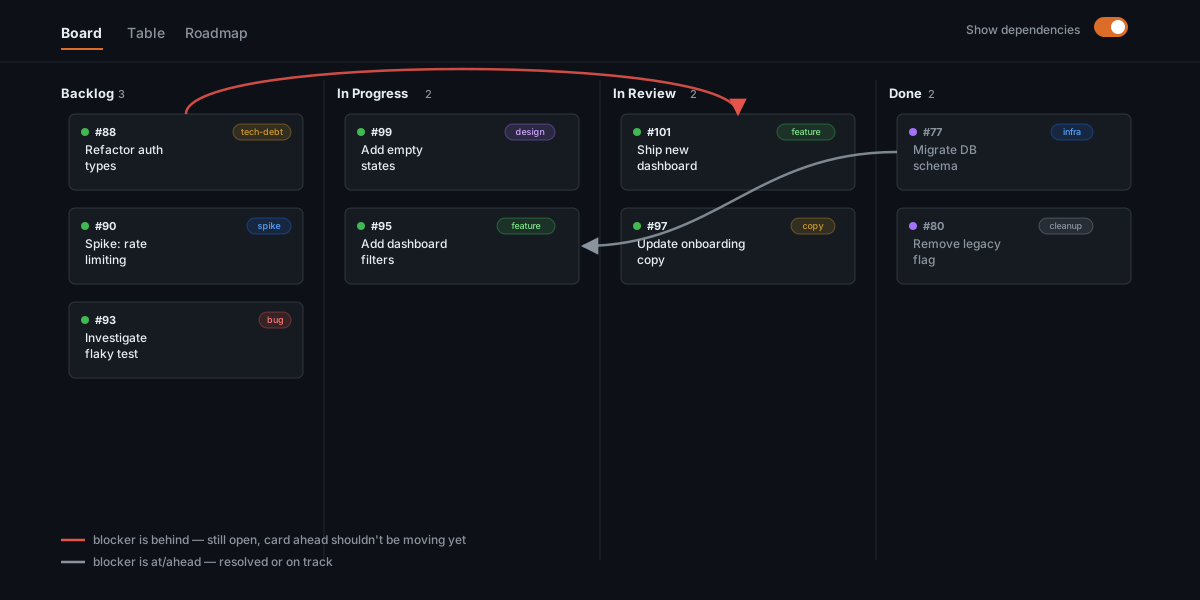
On a GitHub Projects Board (kanban) view, draws an arrow directly between any two currently-visible cards where one blocks the other — red if the blocker is behind the card it blocks, gray otherwise — no need to open either issue to see the dependency. Off by default; a switch next to the view tabs (shown only while a Board view is selected) turns it on, and the choice is remembered (also switchable from Settings).
Full-width board — features/full-width-board
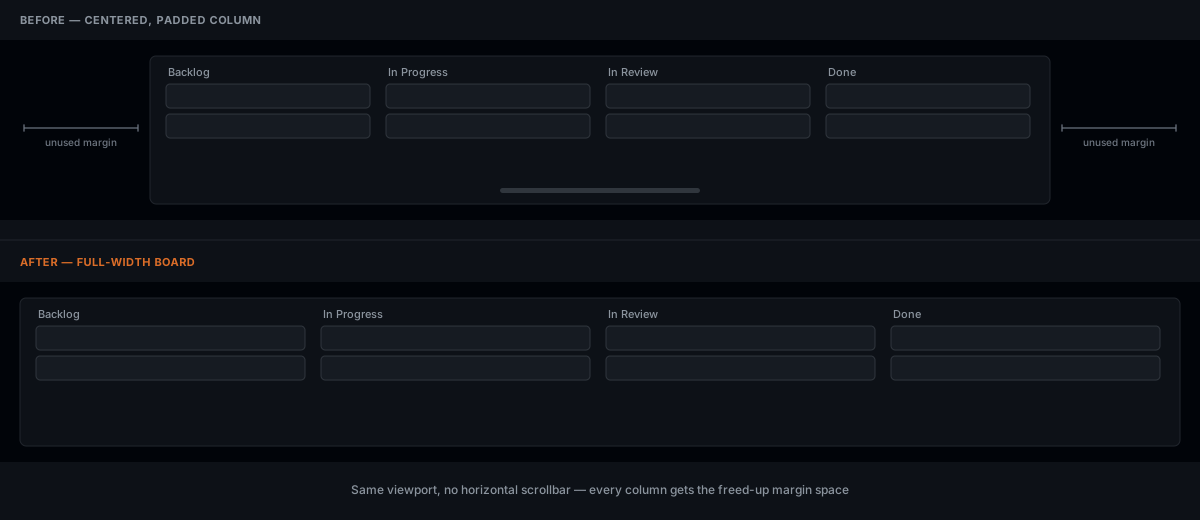
On a GitHub Projects Board (kanban) view, stretches the board to the full window width instead of the page’s normal centered column — more room for columns before they need to scroll horizontally. On by default; switchable from Settings.
More features will land as their own entries here, each in its own folder under features/ (and background/ for anything they need server-side). See Contributing for the shape a new one takes.
Project layout
manifest.json                       MV3 manifest — wires content scripts and the background service worker
background.js                       Service worker entry point: opens Settings, routes messages to feature modules
lib/github-api.js                   Shared GitHub REST/GraphQL client (auth, caching) used by every feature
background/<feature>.js             One feature's server-side logic (GitHub calls, computation) + its MESSAGE_TYPE
features/<feature>/                 One feature's content-script side: DOM injection, rendering, styling
options/                             Settings page (GitHub token, quick-create shortcuts, feature toggles)
icons/                               Toolbar/extensions-page icons
Releasing
A push to main that bumps manifest.json’s "version" field is packaged and released automatically by .github/workflows/release-chrome-extension.yml:
- Zips
manifest.json,background.js,background/,features/,icons/,lib/, andoptions/intogh-reloaded-<version>.zip. - Uploads and publishes that zip to the Chrome Web Store, if the store secrets below are configured.
- Attaches the zip to a GitHub Release tagged
v<version>, either way.
A push that doesn’t change the version is a no-op for this workflow — the Chrome Web Store refuses to re-accept a version it already has, so re-submitting unchanged would just fail every time.
Requiring a version bump on every PR
.github/workflows/require-version-bump.yml runs on every pull request into main and fails if manifest.json’s "version" isn’t strictly higher than what’s currently on main — so a feature branch needs its version bump before opening (or before merging) a PR.
By itself this only shows as a pass/fail check on the PR; to actually block the merge button, mark it required:
- Repo → Settings → Branches (or Rules → Rulesets) → add/edit a protection rule for
main. - Enable Require status checks to pass before merging.
- Add
Require Version Bump / check-versionto the required list (it only appears in the picker after the workflow has run at least once on a PR).
This repo’s own settings aren’t something this workflow file can change — it needs to be turned on by a repo admin from the GitHub UI (or via the API) the same way any other required check would be.
One-time store setup
The API can only update an existing Chrome Web Store listing — the first submission has to happen by hand:
- Pay the one-time $5 registration fee and create a Chrome Web Store Developer Dashboard account.
- Package the extension (
zip -r extension.zip manifest.json background.js background features icons lib options), upload it as a new item, fill in the store listing (description, screenshots, privacy practices, single purpose, permission justifications), and submit it for review. - Once it’s accepted, note the Extension ID (from the dashboard item URL) and your Publisher ID (Dashboard → account settings → Publisher (developer) account).
- In Google Cloud Console, create an OAuth client (APIs & Services → Credentials → OAuth client ID → type “Desktop app”) and enable the Chrome Web Store API on that project.
- Generate a refresh token for that client, authorized for the
https://www.googleapis.com/auth/chromewebstorescope against your Web Store account — e.g. viachrome-webstore-upload-cli’s docs, or any OAuth 2.0 installed-app flow. -
Add these as Actions secrets (repo Settings → Secrets and variables → Actions):
Secret Value CHROME_EXTENSION_IDExtension ID from step 3 CHROME_PUBLISHER_IDPublisher ID from step 3 CHROME_CLIENT_IDOAuth client ID from step 4 CHROME_CLIENT_SECRETOAuth client secret from step 4 CHROME_REFRESH_TOKENRefresh token from step 5
Until all five secrets are set, the workflow still cuts a GitHub Release on every version bump; it just skips the store upload step (with a warning in the run log) rather than failing the run.
Google’s own review queue still sits on top of this either way — a workflow run “publishing” a release means it was submitted, not that it’s instantly live on the store.
Contributing
See CONTRIBUTING.md for how a feature module is structured and how to add a new one. Issues and PRs welcome.
Privacy
See PRIVACY.md — short version: nothing is collected, sold, or sent anywhere except directly to api.github.com with your own token.