gh-reloaded
Dependency graph
Injects a left-to-right dependency graph below the “Sub-issues” section on a GitHub issue page, and inside a GitHub Projects board’s issue-preview side panel.
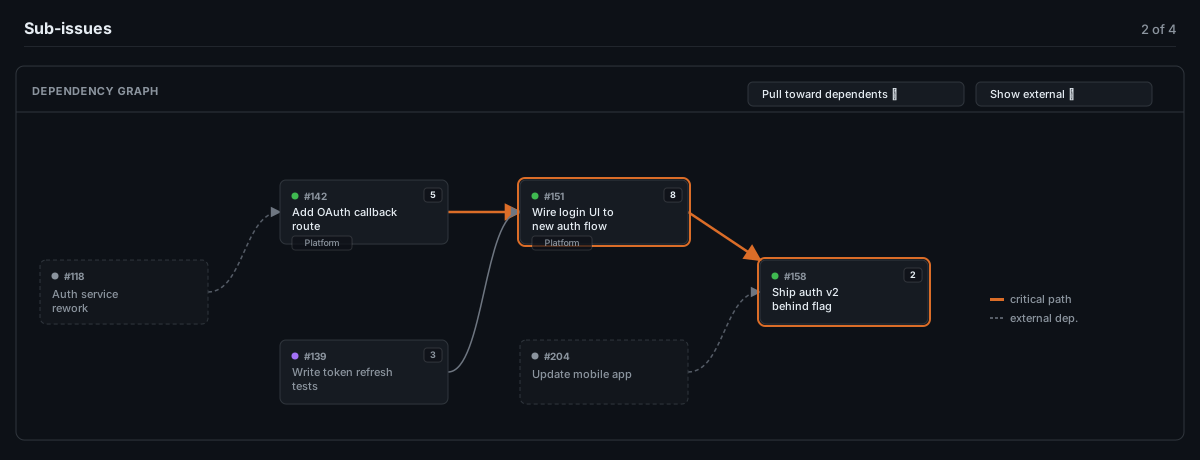
Mockup illustrating the layout and colors — not a literal screenshot.
What it does
- Fetches the issue’s direct sub-issues (REST), and for each one its “blocked by” / “blocking” relationships (Issue Dependencies, REST), Projects v2 Status (GraphQL), and the org-level Team / Business Value / Effort custom fields (REST), when available.
- Lays out left → right: a blocker always renders strictly left of what it blocks. Columns default to pulling a node as close as possible to its nearest dependent (“place a card right before what it blocks”); a dropdown switches to plain as-early-as-possible. Within a column, more-connected nodes float to the top.
- Cards fill with the field’s real configured color — no hardcoded mapping of a status name to a color; whatever the board says is what renders.
- Dependencies outside the direct sub-issue set render as dimmed, dashed “external” nodes/edges, with a dropdown to hide resolved ones or hide external dependencies entirely.
- Highlights the critical path: the longest chain by total Effort, ignoring closed (done) sub-issues, with the tie-break falling back to path length when effort ties (including when nothing is estimated at all) and an unestimated story assumed to cost the median of whatever else in the feature is sized.
- A link icon (not the whole card) navigates to the issue, so the card itself stays free for future interaction.
Known limitations
- Only direct sub-issues become full “internal” nodes — no recursion into grand-children.
- External dependency cards show Status and Team, not Business Value or Effort (not meaningful outside the feature they belong to).
- Anchor detection is text-based (looks for a heading starting with “Sub-issues”); resilient to class/attribute churn, but breaks if GitHub renames the section’s visible text.
- Requires the repo/org to actually have the relevant data available — Issue Dependencies, Projects v2, org-level custom fields. Any of these being absent just means less data shown, not a failure.